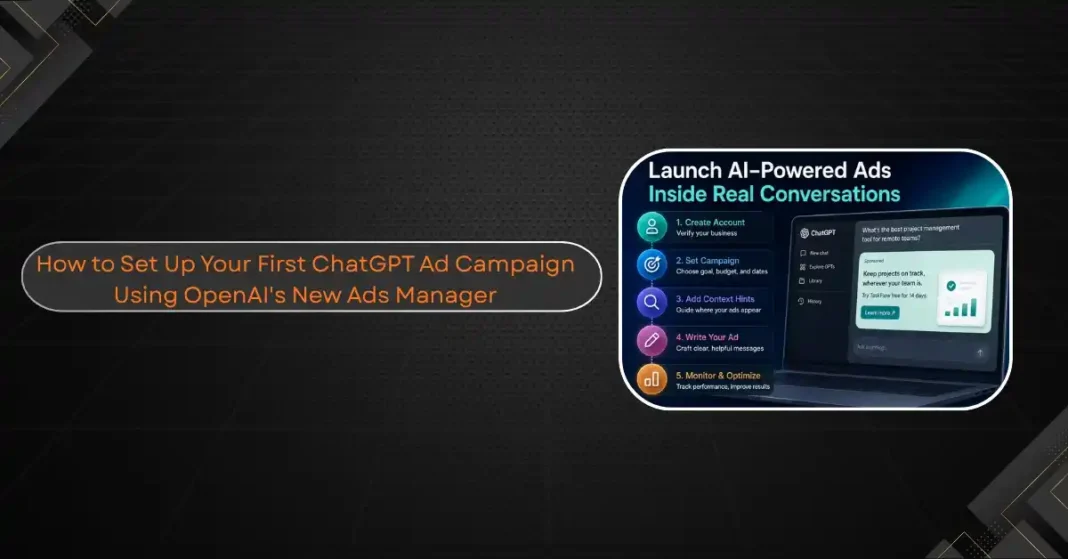
OpenAI opened its self-serve Ads Manager to all US advertisers on May 5, 2026, dropping the previous $250,000 minimum spend requirement and making ChatGPT advertising available to any business willing to go through account verification. The format is different from anything in paid search or social. There are no keyword auctions. There is no Quality Score. Ads appear inside live conversations as contextually matched, tinted placements when OpenAI’s system determines that a user’s query has commercial relevance. This guide covers account setup, campaign structure, creative requirements, and the practical differences from running ads on Google or Meta.
Before You Start: Eligibility and Preparation
ChatGPT Ads are currently available to advertisers in the United States, Canada, Australia, and New Zealand. Eligible product categories include household and consumer goods, local services, travel and experiences, and digital products and education. Dating, alcohol, tobacco, healthcare, financial and legal services, gambling, and political content are excluded from the platform.
Ads only appear to logged-in adults on the Free and Go tiers. Users on Plus, Pro, or Team plans do not see ads. This targeting limitation is worth noting before calculating reach expectations.
Gather the following before opening the Ads Manager. You will need a registered business name, a business website with clear terms of service and a privacy policy, the product or service category you plan to advertise, ad creative assets including a title, body copy, and optionally a 1200×630 pixel image, and the landing page URL for your campaign. Account verification is manual and typically takes a few business days.
Setting Up Your Ads Manager Account
Navigate to ads.openai.com. Click Create Account. You will be asked for your business name, website, billing information, and contact details. After submitting, OpenAI conducts a manual review to verify the business before granting access to the campaign creation tools.
Once approved, the Ads Manager dashboard shows three tabs: Campaigns, Ad Groups, and Ads, which mirrors the structural hierarchy of the platform. Every ChatGPT ad campaign follows the same three-level structure: the Campaign sets the objective, budget, dates, and country targeting; the Ad Group organizes ads around a theme or intent area with context hints; the Ad contains the title, copy, image, and landing page shown in ChatGPT.
Creating Your First Campaign
Click Create in the Campaigns tab. The guided workflow is recommended for first campaigns because it forces an explicit decision at every configuration step.
Name the campaign with a clear internal convention. Something like brand_q2_us_awareness or product_category_objective_date creates records that are searchable later. Select your campaign objective: awareness, consideration, or conversion. Budget and scheduling come next. There is no platform-imposed daily minimum after May 5, 2026. A practical starting budget for testing is $50 to $100 per day, which generates enough impression volume to collect meaningful data inside two to three weeks. Set a start date and either a manual end date or leave it open for ongoing campaigns.
Country targeting at the campaign level determines where eligible users see the ads. Advertisers outside the US should confirm their markets are in the eligible list before launch.
Building Ad Groups with Context Hints
Ad groups are where ChatGPT advertising diverges from search advertising. Instead of keywords, you supply context hints: short phrases describing the types of conversations and user intents where your product is relevant.
Context hints work as interpretive guides rather than exact-match triggers. OpenAI’s system uses them to understand the intent areas where your ads should surface, not as literal keyword matches. Write hints in the language your customers use when they are thinking about your product category. A project management tool might use hints like “choosing team collaboration software,” “alternatives to spreadsheets for project tracking,” and “tools for remote team coordination.” A travel brand might use “planning a long-haul trip,” “comparing flight booking options,” and “travel during school holidays.”
Start each ad group with 10 to 15 context hints covering different angles on the same intent area. After the first week of data, you will see which hint clusters are driving impressions and which are inactive.
Creating the Ad Creative
The Ad level is where the actual creative lives. ChatGPT ad placements are currently text-based with an optional image. The creative appears as a tinted box in the conversation, visually distinct from ChatGPT’s organic response, with a clear sponsored label maintaining the separation between the ad and the model’s answer.
Title character limit: 40 characters. Body copy: 130 characters. The constraints are tighter than most digital advertising formats. Every word has to earn its place.
The most effective ChatGPT ads are written as answers, not interruptions. Users in ChatGPT are in an active research or decision-making context. Ad copy that directly addresses the question they are likely asking outperforms general brand awareness messaging. “Compare project tools before you commit: [product] free trial” works better than “Leading project management software for teams.”
Launch each ad group with at least three ad variations. After seven days, pause the lowest-performing variation and introduce a new test. The iterative process is similar to Google Ads testing, but the feedback loop is slower because impression volume takes time to build in a new platform.
Monitoring Performance and What to Expect
After campaigns are submitted and approved, the Ads Manager shows impressions, clicks, and the click-through rate. Approval for individual ads typically takes under 24 hours assuming the creative and landing page comply with OpenAI’s policies.
Early benchmarks from the managed pilot phase suggest CTRs above social media averages, which fits the high-intent nature of the ChatGPT user base. CPM pricing is still in a price discovery phase. The $60 CPM figure reported from the managed launch in early 2026 may shift as the self-serve market matures and more advertisers join.
The platform is early. Reporting capabilities are limited compared to Google Ads or Meta Ads Manager. Conversion tracking, audience insights, and attribution are still developing. Run ChatGPT Ads as part of a broader media mix rather than as a standalone channel, and document learnings from each campaign carefully while the platform develops.