Introduction
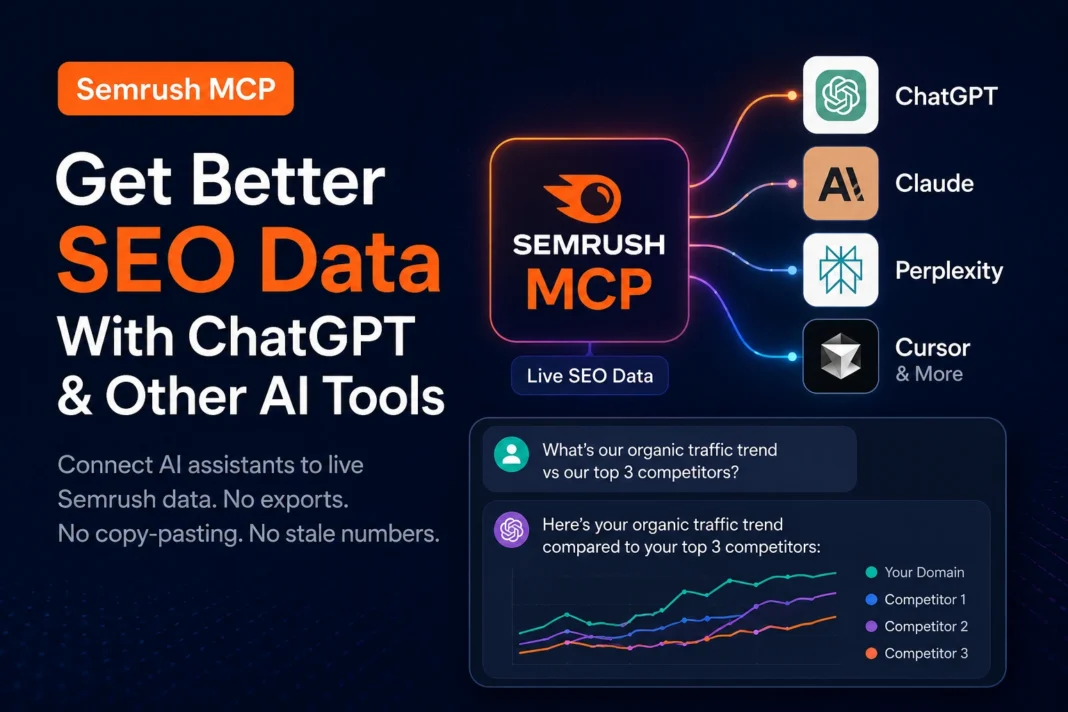
Picture this. You’re chatting with ChatGPT about a client’s website. You ask, “How’s our organic traffic trending compared to our biggest competitor?” And instead of saying “I don’t have access to that,” it just… answers. With real numbers. Pulled live from Semrush.
That’s not a hypothetical anymore. It’s what the Semrush MCP connector does.
For years, using AI for SEO meant a clunky routine: log into Semrush, export a CSV, copy the numbers, paste them into ChatGPT, then hope you didn’t miss a column. Every question meant another export. Every new teammate meant re-explaining the whole process.
The common pain points are familiar to anyone who’s done SEO reporting:
- Constantly switching tabs between your AI assistant and your SEO dashboard
- Copy-pasting data that goes stale the moment you paste it
- Spending more time formatting reports than analyzing them
- AI tools giving generic SEO advice because they can’t see your actual data
Semrush MCP fixes this by giving AI assistants a direct, live line to Semrush’s data. No exports. No copy-pasting. No stale numbers.
In this guide, you’ll learn exactly what Semrush MCP is, how it works under the hood, how to connect it to ChatGPT, Claude, and other AI tools, and whether it’s actually worth setting up for your workflow.
Key Takeaways
- Semrush MCP is an official connector built on the Model Context Protocol (MCP), an open standard originally created by Anthropic, that lets AI assistants pull live Semrush data instead of relying on manual exports.
- It’s available as an official app inside ChatGPT, Claude, and Perplexity, and can also be connected to tools like Cursor, VS Code, and Claude Code.
- Setup takes minutes using OAuth or an API key — no coding required for the official hosted connector.
- It covers keyword research, domain analytics, backlink data, traffic analysis, and competitive intelligence.
- It’s most valuable for SEO leads, agencies, and growth teams who answer the same kinds of data questions repeatedly and want to skip the export-and-paste cycle.
- It uses your Semrush API units, so heavy use can add up — caching and batching queries helps control costs.
What Is Semrush MCP, Really?
Let’s back up and explain MCP itself first, because that’s the part that trips people up.
MCP stands for Model Context Protocol. Think of it like a universal power adapter, but for AI. Normally, if you want an AI assistant to talk to a specific piece of software, someone has to build a custom, one-off integration. That’s expensive and slow, and it means every tool needs its own separate plug.
MCP replaces all those different plugs with one standard socket. Any AI assistant that “speaks MCP” can connect to any tool that “speaks MCP” — including Semrush — without custom code.
Semrush MCP, then, is simply Semrush’s implementation of that standard. It’s a server that sits between your AI assistant and Semrush’s databases. When you ask your AI a question, it doesn’t guess the answer. It sends a request through the MCP connection, Semrush’s servers return the actual data, and the AI weaves that real data into its response.
In plain terms: your AI assistant stops guessing and starts querying.
A Simple Analogy
Imagine your AI assistant is a smart intern. Without MCP, that intern only knows what you tell them — nothing more. With MCP, that same intern now has a badge that lets them walk into the Semrush data room, pull the exact report they need, and bring it back to you in seconds.
How Semrush MCP Works (Without the Jargon)
Here’s the flow, step by step:
- You ask a question. For example, “What’s our biggest keyword gap versus [competitor]?”
- Your AI assistant figures out what data it needs. It recognizes this requires keyword gap data from Semrush.
- It sends a request through the MCP connection. This is a structured, secure request — not a raw scrape.
- Semrush’s API returns the data. Real search volumes, real rankings, real traffic estimates.
- The AI turns that data into a readable answer. Instead of a spreadsheet, you get a plain-English summary you can act on.
The magic isn’t that the AI got smarter. It’s that the AI finally has eyes on your actual numbers instead of working from memory or general SEO knowledge.
Step-by-Step Tutorial: Connecting Semrush MCP to Your AI Tools
Requirements
- An active Semrush account (the specific plan requirements can vary, so check your current plan’s API access)
- The AI assistant you want to connect — ChatGPT, Claude, Perplexity, Cursor, or another MCP-compatible tool
- A few minutes and either an API key or your Semrush login credentials for OAuth
Setup Instructions (Official Hosted Connector)
- Open your AI assistant’s connector or app settings. In Claude, this is usually under Settings, or your MCP connector marketplace section. In ChatGPT, look for the apps or connectors panel.
- Search for “Semrush” in the connector directory. Since Semrush MCP is offered as an official app, it should appear directly in the list.
- Click Connect. You’ll be prompted to authenticate — usually via OAuth (log in with your Semrush account) or by pasting in an API key from your Semrush account settings.
- Grant the requested permissions. Read-only access is typically sufficient for research and reporting use cases.
- Test it with a simple question. Something like “What’s the organic traffic estimate for [your domain]?” is a good first test.
- Confirm the data looks right. Cross-check one or two numbers against your Semrush dashboard the first time, just to build trust in the connection.
Screenshots Needed
- Screenshot of the connector/app marketplace inside the AI assistant
- Screenshot of the Semrush OAuth authentication screen
- Screenshot of a sample AI response containing live Semrush data
Best Practices
- Start with read-only permissions. You rarely need write access for research and reporting tasks.
- Ask specific questions. “Compare organic traffic for these two domains over the last 6 months” works better than “Tell me about SEO.”
- Chain related questions in one session. Context carries over, which saves API calls and gives more consistent answers.
- Cache results for dashboards. If you’re building a recurring report, pull the data once and reuse it instead of re-querying every time someone opens it.
Troubleshooting Tips
- “No data returned” errors usually mean a permissions issue — recheck what scopes you granted during setup.
- Rate limit errors mean you’ve used up your available API units for the period; Semrush plans have unit limits, so pace out heavy research sessions.
- Inconsistent numbers between sessions are often caused by different date ranges being applied automatically — always specify the timeframe in your question.
- Connector shows “needs reconnect” — this typically happens after a password change or extended inactivity; simply re-authenticate.
Semrush MCP vs. Manual Exports vs. Third-Party MCP Tools
| Feature | Semrush MCP (Official) | Manual CSV Export | Community/Self-Hosted MCP Server |
|---|---|---|---|
| Setup time | Minutes | N/A (but repeated every time) | 15–30 minutes, needs technical setup |
| Coding required | None | None | Basic (Node.js, API key management) |
| Data freshness | Live | Stale after export | Live |
| Works across ChatGPT/Claude/Perplexity | Yes | N/A | Depends on client configuration |
| Best for | Most users, teams, agencies | One-off, simple checks | Developers wanting custom tool sets |
| API unit usage | Standard, tied to your plan | None extra | Standard, tied to your API key |
Benefits of Using Semrush MCP
Main benefits:
- Eliminates repetitive copy-pasting between dashboards and AI chat windows
- Keeps every team member working from the same live data source
- Turns raw data into plain-English answers instantly
- Makes it easy to ask follow-up questions without starting over
Real-world applications:
- An agency running weekly client check-ins without manually rebuilding reports each time
- A growth team validating a new content idea against real search demand before writing a single word
- A leadership team asking “how are we doing against competitors this quarter” and getting a direct answer instead of waiting on an analyst
Who should use it:
- SEO professionals and agencies handling multiple clients or domains
- Content and growth teams who frequently need competitive or keyword data
- Anyone already comfortable using AI assistants for research who wants to stop manually feeding them data
Who should avoid it (for now):
- Solo bloggers or hobbyists who check SEO data only occasionally — a manual dashboard visit may simply be simpler
- Teams without an active Semrush subscription, since MCP is a connector, not a replacement for the underlying product
- Anyone deeply concerned about API unit consumption without a plan to monitor usage
Common Mistakes to Avoid
- Granting broader permissions than needed. Fix: default to read-only access unless you specifically need the AI to take actions on your account.
- Asking vague questions. Fix: name the domain, metric, and timeframe explicitly in your prompt.
- Not checking API unit usage. Fix: check your balance regularly so a busy research day doesn’t quietly burn through your monthly allowance.
- Treating AI output as gospel without spot-checking. Fix: verify a sample of numbers against the Semrush dashboard, especially early on.
- Re-querying the same data repeatedly for static dashboards. Fix: cache results and only refresh on a schedule that matches how often the underlying data actually changes.
Expert Tips Not Commonly Discussed
- Batch your questions. Instead of five separate questions about five competitors, ask for a single comparison across all five — it’s usually more efficient on API units and gives you a more useful side-by-side answer.
- Use MCP for the “boring” recurring reports first. The biggest time savings usually come from automating repetitive weekly or monthly reporting, not from one-off deep dives.
- Pair MCP with a written prompt template. Standardizing how your team phrases requests (e.g., always specifying domain, date range, and metric) produces far more consistent answers.
- Review connected apps periodically. Since MCP connections persist across sessions, it’s worth an occasional audit of which tools still have access to your Semrush account.
Future Trends: What’s Next for AI + SEO Data
The direction here is fairly clear: SEO tools are racing to become “AI-native” rather than “AI-compatible.” A few things worth watching:
- More AI platforms adding official connectors. Semrush MCP already spans ChatGPT, Claude, and Perplexity — expect more assistants and browser-based AI agents to follow.
- Deeper competitive and traffic intelligence baked into everyday AI conversations, not just dedicated SEO tools.
- Scheduled, autonomous monitoring where AI agents check keyword movements or traffic anomalies on a recurring basis and proactively flag issues, rather than waiting to be asked.
- Convergence with “AI visibility” tracking — as more people search and shop through AI answer engines instead of traditional search results, expect SEO data connectors to expand into tracking brand visibility inside AI-generated answers, not just classic search rankings.
The broader pattern: the gap between “having data” and “acting on data” keeps shrinking. MCP is one of the clearest examples of that shift so far.
Conclusion
Semrush MCP solves a genuinely annoying problem: the constant back-and-forth between your SEO dashboard and your AI assistant. By giving AI tools direct, live access to Semrush’s data, it turns generic AI chat into an assistant that can actually see your numbers and reason about them.
Key takeaways:
- It’s built on MCP, an open standard for connecting AI to external data
- Setup is quick, especially through the official hosted connector
- It’s most valuable for teams handling repetitive SEO reporting and research
- Read-only access, specific prompts, and periodic spot-checks keep it running smoothly
If you’re already using AI tools for SEO work and find yourself exporting the same reports over and over, this is worth setting up. If your SEO checks are occasional and light, it’s fine to hold off until your workflow demands more automation.
Frequently Asked Questions
1. What is Semrush MCP? Semrush MCP is an official connector that lets AI assistants like ChatGPT and Claude access live Semrush data directly, instead of relying on manual exports.
2. Is Semrush MCP free? The connector itself doesn’t have a separate fee beyond your existing Semrush plan, but it uses your account’s API units, and access to Semrush data still requires an active subscription.
3. Which AI tools support Semrush MCP? Semrush MCP is available as an official app in ChatGPT, Claude, and Perplexity, and can also be connected to tools like Cursor, VS Code, and Claude Code.
4. Do I need to know how to code to use Semrush MCP? No. The official hosted connector uses OAuth or an API key and can be set up through your AI assistant’s settings without writing any code.
5. Is Semrush MCP the same as the Semrush API? No, but it’s built on top of it. The API is the underlying data source; MCP is the standardized bridge that lets AI assistants query that API in natural language.
6. Does Semrush MCP give AI assistants real-time data? Yes, queries pull live data from Semrush’s servers at the time you ask, rather than relying on a static export.
7. Can Semrush MCP replace my Semrush dashboard entirely? Not entirely. It’s best used alongside your dashboard for quick queries, natural-language analysis, and reporting, while the full dashboard remains useful for deep, visual exploration.
8. Will using Semrush MCP use up my API units faster? It can, especially with frequent or broad queries. Batching related questions and caching results for recurring reports helps manage usage.
9. Is my Semrush data secure when connected through MCP? Reputable implementations use OAuth or encrypted API key authentication, and you control the permission scopes granted to each connected AI tool.
10. Can I use Semrush MCP for competitor analysis? Yes, competitive research — including keyword gaps, traffic comparisons, and backlink profiles — is one of the most common use cases.
11. What’s the difference between the official Semrush MCP and community-built MCP servers? The official connector is hosted by Semrush and requires no technical setup, while community-built servers are self-hosted, require a Node.js environment and API key management, but can offer more customization.
12. Do I need a paid Semrush plan to use MCP? You need an active Semrush account with API access; specific plan requirements can vary, so it’s worth checking your current plan’s details before setting up the connector.
13. Can small businesses or solo bloggers benefit from Semrush MCP? They can, but the benefit is smaller if SEO checks are infrequent. It shines most for teams handling recurring, repetitive data questions.
14. How is Semrush MCP different from just asking ChatGPT SEO questions directly? Without MCP, ChatGPT can only give general SEO advice based on training knowledge. With MCP, it can pull your actual site’s live data and give answers specific to your numbers.
15. Is MCP a Semrush-only technology? No. Model Context Protocol is an open standard originally introduced by Anthropic, and many other tools beyond Semrush have built or are building their own MCP connectors.