Running a small business in 2026 without some form of AI automation means spending hours each week on work that software handles in minutes. Replying to routine customer inquiries. Moving data between apps. Generating first drafts of emails and proposals. Scheduling and resizing social content. None of these tasks requires human judgment. All of them eat time that small teams do not have to spare.
The problem is that the market for AI automation tools has gotten genuinely crowded. There are dozens of options, many of them overlap significantly, and the pricing structures make it hard to compare them without actually testing them.
These seven tools have been evaluated based on real-world small business use cases: lead capture, customer support routing, social content production, email follow-up sequences, document generation, and cross-app data syncing. Here is what actually delivers, what it costs, and what to use it for.
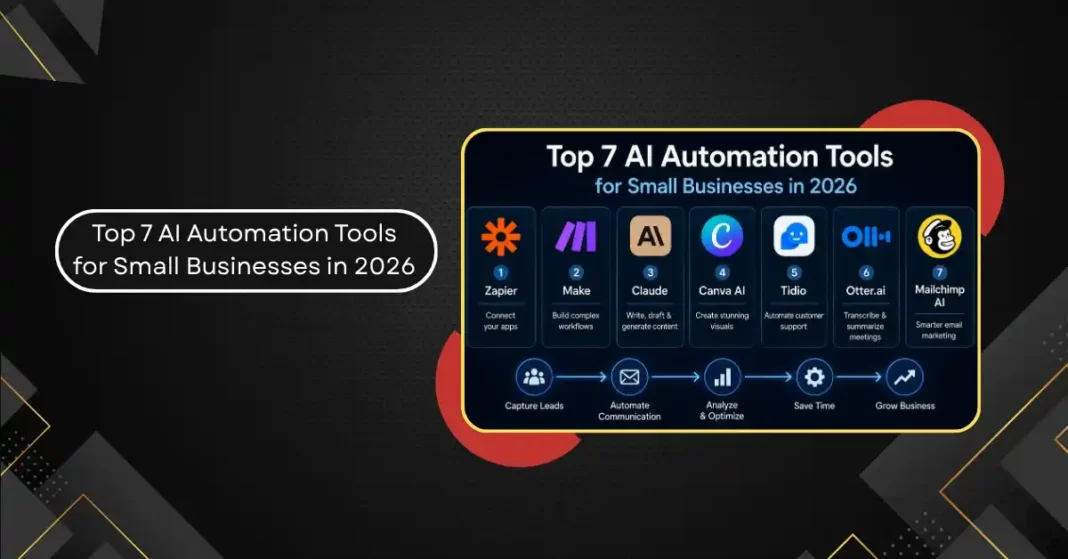
1. Zapier: Best for Connecting Your Existing Tools
Zapier remains the most practical starting point for small business automation in 2026 because it connects to more than 7,000 apps. That library is its primary advantage. Almost any two tools a small business uses can be connected through Zapier without writing code.
The core model is simple: a trigger in one app automatically kicks off an action in another. A new form submission creates a contact in your CRM. A new invoice gets logged in your accounting tool. A customer email tagged as urgent creates a task in your project management system.
The AI layer added in 2025 and expanded in 2026 lets you describe an automation in plain English (“When I get a new lead in HubSpot, summarize their LinkedIn profile and draft a personalized follow-up email”) and Zapier builds the workflow. For small business owners who are not developers, this is a meaningful usability improvement.
The main limitation is cost at scale. The free tier allows 100 tasks per month, which runs out quickly for active businesses. The Starter plan at $19.99 per month is the practical entry point, and multi-step workflows require a Professional plan at $49 per month.
Best for: connecting apps you already use, automating data entry and routing, building “when X happens, do Y” sequences across popular platforms.
2. Make (formerly Integromat): Best for Complex Workflows on a Tighter Budget
Make does what Zapier does but with more flexibility for complex multi-step workflows, at a lower price point. Where Zapier’s interface is designed for simplicity, Make’s visual canvas shows the entire logic of an automation at once, which makes debugging and editing more intuitive for anything beyond a basic two-step flow.
The free tier is more generous than Zapier’s: 1,000 operations per month at no cost. Paid plans start at $9 per month. For a small business willing to spend a bit more time on setup, Make offers substantially more automation power per dollar than Zapier.
The tradeoff is the learning curve. Make’s visual builder is more powerful but less immediately obvious. Expect to invest two to three hours learning how it works before you are building automations quickly.
Best for: small businesses with slightly complex workflows (multi-step logic, data transformation, conditional branching) and tighter budgets than Zapier’s upper tiers require.
3. Claude (Anthropic): Best for Drafting, Writing, and Document Generation
This might seem like an unusual inclusion on an automation list, but Claude has become a practical productivity tool for small businesses because of how well it follows detailed, specific instructions and maintains a consistent voice across different types of written output.
The use case is not general chatting. It is using Claude as a drafting engine for work that previously required a copywriter or significant manual effort: proposal templates, customer email responses, contract summaries, job descriptions, social captions, blog outlines, and FAQ documents.
Where Claude outperforms other AI writing tools for business use is in following complex brand guidelines and voice instructions. If you give it a detailed brief about your company’s tone (warm but professional, direct, avoids jargon, never uses certain phrases), it maintains that more consistently than most alternatives. For businesses with a strong brand voice that needs to carry through written communications, this reliability matters.
The practical workflow: maintain a document with your company’s voice guidelines and background context. Paste it at the start of any Claude session. Then generate the specific piece of content you need. The output requires editing but the editing is refinement rather than reconstruction.
Claude Pro is $20 per month. For small teams producing regular written content, the time savings on drafting typically justify that cost within the first week.
Best for: generating first drafts of proposals, emails, job descriptions, FAQs, social content, and any other written business communication at consistent quality.
4. Canva AI: Best for Visual Content at Scale
Canva’s AI tools have matured significantly in 2026. Magic Design generates complete design layouts from a text description. Magic Write handles caption and copy generation inside the design tool. The background removal and image enhancement tools handle photo editing tasks that previously required Photoshop skills.
For small businesses producing regular social content, marketing materials, and presentation decks, Canva AI removes the design bottleneck without requiring a designer. The quality is not comparable to bespoke brand design work, but for operational visual content (social posts, email headers, event flyers, product showcase images), it is consistently good enough and dramatically faster.
Canva Pro at $13 per month unlocks the AI features. Teams of up to five people can share a Pro account under the Teams plan.
The limitation: AI-generated imagery from Canva’s tools is becoming easier to identify as generic. For anything requiring distinctive brand photography or custom illustration, Canva AI is a supplement to real visual content, not a replacement for it.
Best for: social media graphics, presentations, marketing flyers, and any visual content that needs to look professional without requiring a designer.
5. Tidio: Best for AI Customer Support Automation
Tidio combines live chat with an AI chatbot called Lyro that learns from your existing support content and handles routine customer questions without human involvement. For small businesses with e-commerce or service businesses that receive repetitive customer inquiries, Lyro can handle 70 percent or more of incoming questions automatically.
The setup process involves training Lyro on your FAQ content, product information, and return/cancellation policies. It takes two to three hours to do this properly. After that, Lyro handles questions about order status, product compatibility, shipping times, and policy queries around the clock.
For questions it cannot answer, Tidio escalates to a human agent with a summary of the conversation, so the handoff is smooth rather than requiring the customer to repeat themselves.
Tidio’s free tier handles limited conversations per month. The Communicator plan at $19 per month and the Chatbots plan at $19 per month handle more volume. The Lyro AI add-on starts at $39 per month for unlimited AI conversations.
Best for: e-commerce businesses, service companies, and any small business that receives high volumes of repetitive customer questions through a website chat interface.
6. Otter.ai: Best for Meeting Documentation and Follow-Up
Otter.ai connects to Zoom, Google Meet, and Microsoft Teams to record, transcribe, and summarize meetings in real time. By the time a call ends, Otter has produced a transcript, a summary, and a list of action items.
The meeting documentation problem is one that every small business team has. Important decisions get made in meetings and then remembered differently by different participants. Action items get lost. Commitments made in passing do not get followed up on. Otter eliminates this not by improving how people communicate but by reliably capturing what was said and what needs to happen next.
The AI Summary feature condenses a one-hour meeting into a half-page recap. The action item extraction pulls out specific commitments and assigns them to the people who made them. For small teams without an operations coordinator, this is a genuine productivity recovery.
The free plan covers 300 minutes of transcription per month. The Pro plan at $16.99 per user per month covers 1,200 minutes with more advanced AI features.
Best for: teams with regular client calls, team meetings, or discovery sessions that need reliable documentation without someone manually taking notes.
7. Mailchimp with AI: Best for Email Marketing Automation
Mailchimp’s AI tools in 2026 cover the full email marketing workflow for small businesses: subject line generation, campaign copy drafting, send-time optimization, and audience segmentation recommendations.
The send-time optimization feature uses each contact’s historical open behavior to send emails at the individual level at the time they are most likely to be opened. For businesses with a list of any meaningful size, this consistently improves open rates without requiring any manual work.
The Content Optimizer gives feedback on email copy before you send, flagging subject lines likely to get filtered as spam, copy that is too promotional, and calls to action that are poorly positioned. These are the kinds of editorial checks that used to require a copywriter to review every email before it went out.
Mailchimp’s free tier handles up to 500 contacts. The Essentials plan starts at $13 per month. The Standard plan at $20 per month unlocks the full AI suite including send-time optimization and advanced segmentation.
Best for: small businesses running regular email newsletters, promotional campaigns, or automated welcome and follow-up sequences.
How to Build an Actual Stack, Not Just a Tool List
A list of tools only helps if you connect them into a workflow that reduces friction rather than adding new software to manage.
For a service business, the foundational stack is: Claude or a similar AI writing tool for proposal and email drafting, Zapier or Make to automate lead routing and CRM updates, Otter.ai for meeting documentation, and Mailchimp for follow-up email automation. Total monthly cost at the entry levels: approximately $70 to $90 per month.
For an e-commerce business, replace Otter with Tidio for customer support automation, add Canva AI for product content and social visuals, and keep the rest of the stack.
The mistake most small businesses make is adopting too many tools without connecting them. The power of automation is that when tools talk to each other, tasks happen without anyone initiating them. A new lead fills out a form, Zapier creates the CRM contact, sends a notification to the relevant team member, and triggers a Mailchimp welcome sequence, all without anyone touching anything.
Start with the two or three manual tasks that consume the most time in your week, find tools that handle those specifically, and connect them through Zapier or Make. Add more tools only after the first ones are running reliably. That approach produces a useful stack in two to three weeks rather than months.