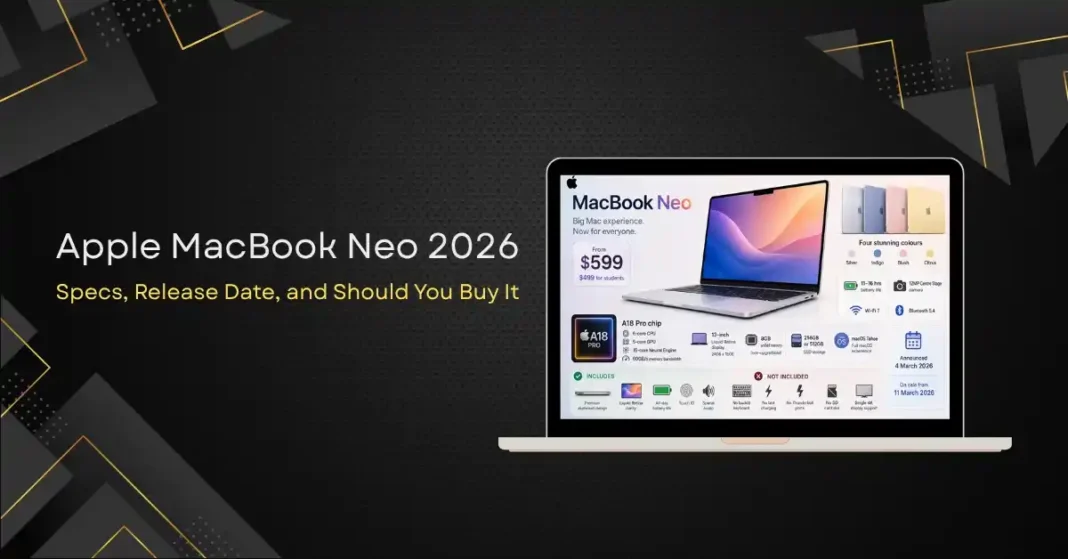
Apple has spent decades making premium laptops. The MacBook Air and MacBook Pro are genuinely excellent products, and they are genuinely expensive ones. On 4 March 2026, Apple did something it has not done in years. It launched a Mac that most people can actually afford.
The MacBook Neo is Apple’s new entry-level laptop, starting at $599 (or $499 for students and educators). It sits below the MacBook Air in the Mac lineup and is designed for mainstream users, students, and first-time Mac buyers. Industry analysts have already called it a sensation, and one that could disrupt the affordable laptop market the way the original MacBook Air disrupted premium laptops nearly two decades ago.
Here is everything you need to know about the MacBook Neo, including the full specifications, who it is and is not for, and how it compares against the rest of the Mac lineup and competing Windows machines.
MacBook Neo Key Specifications
Chip: Apple A18 Pro (6-core CPU, 5-core GPU, 16-core Neural Engine)
Memory: 8GB LPDDR5X-7500 (unified, non-upgradable)
Storage: 256GB or 512GB SSD
Display: 13-inch, 2408 x 1506 Liquid Retina IPS, uniform thin black bezels
Battery life: 11 to 16 hours depending on workload
Operating system: macOS Tahoe (same as the rest of the current Mac lineup)
Colours: Silver, Indigo, Blush, Citrus
Connectivity: USB-C (charging and data), 3.5mm headphone jack, Wi-Fi 7, Bluetooth 5.4
Camera: 12MP Centre Stage front camera
Speakers: Stereo speakers with Spatial Audio support
Weight: Approximately 1.18 kg
Price: $599 / $499 (education)
Release date: Announced 4 March 2026, on sale from 11 March 2026
The A18 Pro Chip: Why It Matters
The MacBook Neo is the first Mac ever to use an A-series chip, the family of processors previously reserved for the iPhone. The A18 Pro (found in the iPhone 16 Pro) has been adapted for the Neo with one fewer GPU core. The result is a 6-core CPU, 5-core GPU, 16-core Neural Engine, and 60GB/s memory bandwidth, with hardware-accelerated ray tracing.
This is a significant architectural decision and worth thinking about carefully.
A-series chips are designed primarily for thermal efficiency. They deliver strong everyday performance with excellent battery life and remain cool under typical workloads. For the tasks the Neo is designed for (web browsing, document editing, video streaming, light creative work, email, video calls, school assignments), the A18 Pro is genuinely capable. Apple Intelligence features, including AI writing tools, smart summaries, image generation, and Siri’s expanded capabilities, are fully supported.
What you do not get with an A-series chip is the sustained performance under load that the M-series chips provide. The M-series chips have more cores, more memory bandwidth, larger thermal headroom, and better performance on professional creative workloads. For light and medium use, the A18 Pro is more than adequate. For sustained heavy use, it is not.
This is the right design choice for this product. Apple has built a laptop optimised for people who never push their computer particularly hard, and priced it accordingly.
What the Neo Gives You at $599
At $599, you get a laptop that no comparable Windows device or Chromebook can match for software quality, build materials, and long-term software support.
The aluminium chassis is light and rigid, the Liquid Retina display is sharp and colour-accurate, and the full macOS experience (including compatibility with the entire Apple ecosystem of apps, Continuity features with iPhone and iPad, AirDrop, Handoff, Universal Clipboard, and iCloud integration) is remarkable at this price.
The battery life of 11 to 16 hours is genuinely practical for a full day of use on a single charge. The device is light, thin, and portable. And because it runs the same macOS Tahoe as MacBook Pro models costing four times as much, there is no software compromise. You get the same operating system, the same security model, the same Apple Intelligence features, and the same compatibility with the rest of the Mac software ecosystem.
The build quality at this price is genuinely impressive. The 13-inch Liquid Retina display, the precision aluminium chassis, the Force Touch trackpad, and the overall fit and finish are all things you typically pay several hundred dollars more for in the Windows market.
What the Neo Does Not Give You
No product at $599 is without compromises, and the MacBook Neo has several real ones that buyers should understand before purchasing.
No backlit keyboard. This is a genuine inconvenience for anyone who types in dim environments. It is the single most-discussed compromise in early reviews.
No fast charging. The Neo charges meaningfully slower than the MacBook Air and MacBook Pro. Expect roughly three hours for a full charge from empty.
No Thunderbolt ports. Only USB-C connections are available, which limits high-speed peripheral connectivity and external display options.
8GB of RAM only, and the RAM is not upgradable. For intensive multitasking, large Excel files, complex Lightroom catalogues, video editing, or 3D modelling, this will eventually become limiting. For typical student and everyday use, 8GB is enough today and probably for the next few years.
External display support is limited to a single 4K monitor.
No SD card slot. Photographers and content creators who routinely transfer from SD cards will need a dongle.
The webcam is improved over older entry-level Macs but is still below the standard set by the MacBook Pro.
For the target audience (students, casual users, first-time Mac buyers, anyone who mainly browses, writes, and watches video), these compromises are acceptable. For professional creative work, they are not, and Apple would prefer you spend more on a MacBook Air or MacBook Pro.
Should You Buy the MacBook Neo
The honest answer depends on what you plan to do with it. Here is a framework.
Buy the MacBook Neo if you are
1. A first-time Mac buyer who wants to try the Apple ecosystem at a low entry price.
2. A student looking for a reliable, well-built laptop for coursework, research, and entertainment.
3. Someone replacing an older Windows laptop or Chromebook for everyday use.
4. A parent buying a laptop for a child or older relative who does not need much computing power but values software simplicity.
5. A second-laptop buyer who wants a lightweight macOS device alongside a more powerful primary machine.
6. Anyone who values battery life, build quality, and long software support over raw performance.
Do not buy the MacBook Neo if you are
1. Running demanding applications like Final Cut Pro on long projects, Xcode for large codebases, Logic Pro with many tracks, or professional-grade photo and video editing software.
2. A heavy multitasker who routinely keeps dozens of browser tabs and multiple memory-intensive applications open at once.
3. Someone who needs to drive multiple external displays.
4. A frequent user of professional peripherals that require Thunderbolt.
5. Someone who types regularly in low-light environments and would find the lack of a backlit keyboard genuinely annoying.
In those scenarios, the 8GB RAM ceiling, the GPU core reduction, the lack of Thunderbolt, and the missing backlit keyboard will eventually constrain you. Spend more and get a MacBook Air M5 or a MacBook Pro instead.
MacBook Neo vs MacBook Air M5
The MacBook Air M5 starts at around $1,099, which is nearly double the Neo’s price. For that premium you get the more powerful M5 chip, more RAM options (up to 24GB), Thunderbolt 4 connectivity, MagSafe charging, a brighter display, a backlit keyboard, and support for two external displays.
For many users, those are meaningful improvements worth paying for. For students and casual users, the Neo does everything they need at half the cost, and the money saved is better spent on accessories, AppleCare, or simply kept.
A useful test: if you have not personally encountered the limitations of an 8GB RAM machine in the past two years, the Neo will probably be fine for you. If you have, look at the Air M5 instead.
MacBook Neo vs Windows Laptops at $600
At $600, the Windows alternatives are a mix of mid-range business laptops from Dell, HP, and Lenovo, and consumer machines from Asus and Acer. Some of those machines offer more raw specifications on paper, including more RAM, more storage, larger displays, or dedicated GPUs.
What the Neo offers that no Windows machine in this price range matches is the combination of build quality, display quality, battery life, software experience, and long-term update support. macOS receives major OS updates for typically six to eight years on a given hardware generation, with security updates extending several years beyond that. The equivalent commitment from Windows OEMs is significantly shorter and less consistent.
For buyers who do not specifically need Windows applications (Microsoft Office, the Adobe suite, and most major productivity software work on both platforms), the Neo represents a strong value proposition relative to Windows alternatives at the same price.
Strong Demand, Supply Constraints
The MacBook Neo has been a commercial success out of the gate. As of late April 2026, shipping delays were running two to three weeks in most markets, driven partly by component shortages affecting memory supply across the wider PC industry. Apple is operating in supply-chase mode, but availability is expected to normalise through the second half of 2026 as supplier capacity catches up.
For buyers who can wait, holding off for a few weeks after launch typically improves availability and sometimes brings early bundle deals from carriers and education channels.
The Bottom Line
The MacBook Neo is the most important Mac launch in several years, not because it is the most powerful, but because it makes the Mac experience accessible to a much larger audience than ever before. At $599 ($499 for students), it delivers the build quality, display quality, software experience, and battery life that has historically been reserved for laptops costing two or three times as much.
The compromises are real and worth understanding, but for the target audience they are entirely acceptable. For students, casual users, first-time Mac buyers, and anyone who wants a reliable everyday laptop, the Neo is a genuinely strong recommendation. For professional creative work or heavy multitasking, look at the MacBook Air M5 or higher instead.
Frequently Asked Questions
Q1: What is the price of the Apple MacBook Neo in 2026?
A: The MacBook Neo starts at $599, or $499 for verified students and educators. It is the most affordable laptop Apple has ever made.
Q2: What chip does the MacBook Neo use?
A: The MacBook Neo uses the Apple A18 Pro chip, the same processor family found in the iPhone 16 Pro, making it the first Mac to use an A-series chip. It features a 6-core CPU, 5-core GPU, and 16-core Neural Engine.
Q3: When did the MacBook Neo go on sale?
A: The MacBook Neo was announced on 4 March 2026 and went on general sale on 11 March 2026.
Q4: What are the main limitations of the MacBook Neo?
A: The Neo lacks a backlit keyboard, fast charging, and Thunderbolt ports. RAM is fixed at 8GB and is not upgradable, external display support is limited to one 4K monitor, and the SD card slot is not included. These limit professional creative workflows but are acceptable for typical student and everyday use.
Q5: Is the MacBook Neo worth buying for students?
A: Yes, for most students. The MacBook Neo offers outstanding value, with a premium aluminium build, Liquid Retina display, full macOS, Apple Intelligence features, and 11 to 16 hours of battery life at a price significantly below any other Mac.
Q6: How does the MacBook Neo compare to the MacBook Air M5?
A: The MacBook Air M5 starts at around $1,099, nearly double the Neo’s price. The Air offers more powerful performance, more RAM options, Thunderbolt 4, MagSafe charging, a brighter display, and a backlit keyboard. The Neo offers most of the everyday Mac experience at half the cost, with compromises that are acceptable for light and medium use.