Key Takeaways
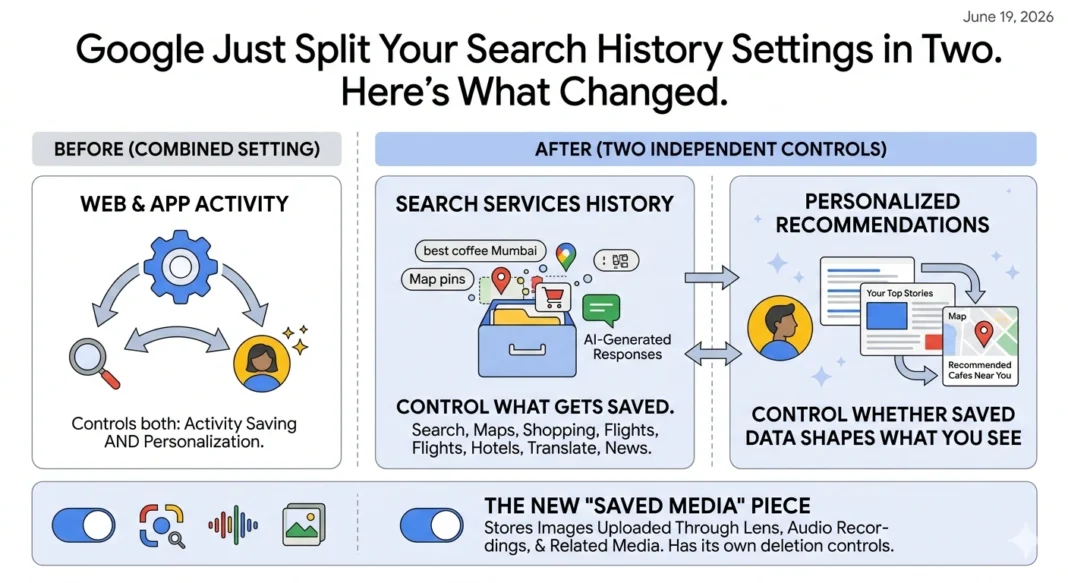
- Google is replacing the combined “Web & App Activity” and “Search Personalization” settings with two independent controls: Search Services History and Personalized Recommendations.
- Search Services History covers what gets saved, your queries, interactions, visited sites, and AI-generated responses, while Personalized Recommendations controls whether that saved data shapes what you see.
- A new “Saved Media” feature can store images uploaded through Google Lens, audio from Search Live, and similar interactions, with its own deletion controls.
- The new settings carry over your existing preferences automatically; if you had Web & App Activity on but Search Personalization off, only Search Services History gets turned on initially.
- The update covers Search, Maps, Shopping, Flights, Hotels, Translate, and News, a broader scope than the original Web & App Activity setting covered alone.
If you’ve gotten an email or in-app notification from Google recently about changes to your search history settings, you’re not imagining it, and it’s not spam. Google is rolling out a genuine restructuring of how it handles saved search activity and personalization, splitting one combined system into two settings that can now be controlled independently.
What Actually Changed
Previously, two settings did most of the work here: Web & App Activity, which handled whether Google saved your search activity at all, and Search Personalization, which handled whether that saved activity was used to tailor your results. They were related but separate toggles, and the naming didn’t always make clear which one controlled what.
Google is replacing this structure with two new, more explicitly named settings: Search Services History and Personalized Recommendations. Search Services History determines whether Google saves your activity in the first place, things like search queries, interactions with Search services, sites you’ve visited, and even AI-generated responses you’ve received. Personalized Recommendations is the separate decision about whether that saved data gets used to show you content tailored to your interests, curated feeds, and similar features.
The practical difference is that you can now decide independently whether Google saves your activity and whether it uses that activity to personalize what you see, rather than those two decisions being bundled closer together under the old structure.
The New “Saved Media” Piece
There’s also a feature most coverage treats as a footnote but is worth understanding on its own: Saved Media. This setting can store images you’ve uploaded through Google Lens, audio recordings from Search Live, and similar media generated through your search interactions.
Google frames this as something that improves experiences like visual search and live conversations, the kind of thing that’s genuinely useful if you’ve ever used Lens to identify something and wanted Google to remember the context. But it’s also a new category of personal data being retained that didn’t have its own explicit setting before. You can delete individual saved media items or turn off media saving entirely, independent of your other history settings.
How the Transition Actually Works for Existing Users
If you’re worried this rollout is going to reset your carefully configured privacy settings, the transition is designed to mirror your existing choices rather than reset them. Google’s stated approach: if you had both Web & App Activity and Search Personalization turned on previously, both new settings start on. If both were off, both new settings start off.
The interesting edge case is what happens if your old settings were mismatched, say, Web & App Activity was on but Search Personalization was off. In that scenario, only Search Services History gets turned on under the new structure, and Personalized Recommendations stays off, matching your prior intent as closely as the new, more granular structure allows.
Your auto-delete preferences also carry over. If you’d previously set Web & App Activity to auto-delete after a set period, that preference continues applying under the new Search Services History setting.
Why the Scope Got Bigger
One detail that’s easy to miss in the rollout announcements: the new settings apply across a wider range of Google Search services than the original setup. The update specifically covers Search, Maps, Shopping, Flights, Hotels, Translate, and News, a broader umbrella than “Web & App Activity” was historically associated with in most people’s minds, even though some of these services were technically already covered.
This matters because it makes the personalization and history controls feel more like a unified privacy dashboard for everything under the Google Search umbrella, rather than a setting that primarily evokes basic web search history. If you’ve used Google Flights or Hotels and never thought about what data that generates or how it’s controlled, this update puts that activity under the same two settings governing your core search history.
What This Means If You Care About Privacy
If your instinct is to turn personalization off entirely, the new split actually makes that decision more precise than it used to be. You can now disable Personalized Recommendations specifically, meaning Google stops using your activity to tailor results, curated feeds, and similar features, while still allowing Search Services History to stay on if you want the convenience of features like reviewing past searches or having autocomplete still function with some memory.
Conversely, if you want to turn off saved history entirely, doing so through Search Services History should also functionally eliminate most personalization, since there’s nothing left for Personalized Recommendations to draw from. Worth noting: turning off personalization doesn’t disable your ability to find past searches in Autocomplete specifically, that’s treated as a slightly separate function under Google’s own documentation.
What This Means If You Work in Marketing or SEO
If you manage paid search, organic content, or any strategy that depends on understanding how personalized Google’s results are for different users, this update is worth tracking, even though it doesn’t change ranking mechanics directly. More granular user control over personalization could, over time, shift the share of searches happening with personalization fully on, fully off, or in some partial state, which affects how representative any single rank-tracking snapshot actually is of what real users see.
It’s also a reminder that “Search results may vary between people for reasons other than personalization,” as Google’s own help documentation states, things like language settings and localized results matter too. If a client or stakeholder is confused about why their own search for a target keyword shows different results than your rank tracker reports, this update is a useful, concrete thing to point to when explaining why personal account settings can affect what someone sees.
Common Mistakes to Avoid
- Assuming the new settings reset your old privacy preferences. They’re designed to mirror your prior Web & App Activity and Search Personalization choices automatically.
- Confusing Search Services History with Personalized Recommendations. One controls whether activity gets saved; the other controls whether saved activity shapes what you see. They’re independent now.
- Forgetting that Saved Media is a separate toggle. Turning off general search history doesn’t automatically stop media like Lens images or Search Live audio from being saved unless you address that setting too.
- Assuming turning off personalization disables Autocomplete history entirely. Google’s documentation specifically notes this isn’t the case; Autocomplete retains some separate functionality.
- Ignoring the broader scope of services now covered. If you’ve used Google Flights, Hotels, Shopping, or Translate, that activity now falls under the same two settings as your core search history.
Expert Tips
If you manage Google account settings for an organization or for clients in any compliance-sensitive context, audit which of the new settings apply and update any internal privacy documentation or client-facing explanations accordingly. The terminology shift from “Web & App Activity” to “Search Services History” is the kind of small naming change that creates real confusion if your documentation still references the old terms.
For anyone genuinely trying to minimize Google’s data retention, address Saved Media specifically rather than assuming a general history toggle covers it. It’s easy to turn off the obvious setting and still have images and audio quietly accumulating in a separate bucket.
What’s Next
This kind of granular settings split tends to be a precursor to further changes rather than a final state. Given how aggressively Google has been expanding AI features across Search, including AI Mode, Gemini integrations, and AI-generated responses now explicitly mentioned as part of what Search Services History can save, it’s a reasonable bet that personalization controls will keep getting more specific as AI-generated content becomes a larger share of what Google actually shows people.
Watch for whether Google eventually breaks Personalized Recommendations down further, separate controls for AI-generated answer personalization versus traditional result personalization, for instance, given how distinct those experiences are becoming.
Conclusion
Google has replaced its combined Web & App Activity and Search Personalization settings with two independent controls: Search Services History, which governs whether your activity gets saved, and Personalized Recommendations, which governs whether that saved activity shapes what you see. A related Saved Media setting now explicitly covers images and audio from features like Lens and Search Live. The transition mirrors your existing preferences automatically, and the new settings cover a broader range of Google services than before. Whether you’re trying to lock down your privacy more precisely or just trying to understand why your settings page suddenly looks different, the underlying logic is the same: Google split one bundled decision into two, giving you more specific control over each piece.
FAQ
What replaced Google’s Web & App Activity setting?
Two new, independent settings: Search Services History, which controls whether your activity is saved, and Personalized Recommendations, which controls whether that saved activity is used to personalize what you see.
Will the new settings reset my current privacy preferences?
No. Google designed the transition to mirror your existing Web & App Activity and Search Personalization choices automatically.
What does Search Services History actually save?
It can include search queries, interactions with Search services, sites you’ve visited, and AI-generated responses you’ve received.
What is Saved Media in the new settings?
It’s a feature that can store images uploaded through Google Lens, audio recordings from Search Live, and similar media generated through your search interactions, with its own separate deletion controls.
Which Google services are covered by the new settings?
The update applies to Search, Maps, Shopping, Flights, Hotels, Translate, and News.
If I turn off Personalized Recommendations, does Google stop saving my history?
Not necessarily. The two settings are independent; you can have Search Services History on while Personalized Recommendations is off, meaning your activity is saved but not used to tailor results.
Does turning off personalization disable Autocomplete history?
No. Google’s documentation specifically notes that turning off personalization doesn’t disable your ability to find past searches in Autocomplete.
Can I delete specific saved media items individually?
Yes. You can delete individual saved media items or turn off media saving entirely at any time.
Will my auto-delete preferences carry over to the new settings?
Yes. Auto-delete preferences previously set for Web & App Activity continue to apply under the new Search Services History setting.
Why are search results sometimes different for two people searching the same term?
Personalization is one factor, but Google notes that language settings and localized results can also cause search results to vary between users.
How do I access these new settings?
You can manage them directly through your Google Account settings at account.google.com, and Google recommends keeping your app updated to ensure the settings display accurately on your device.