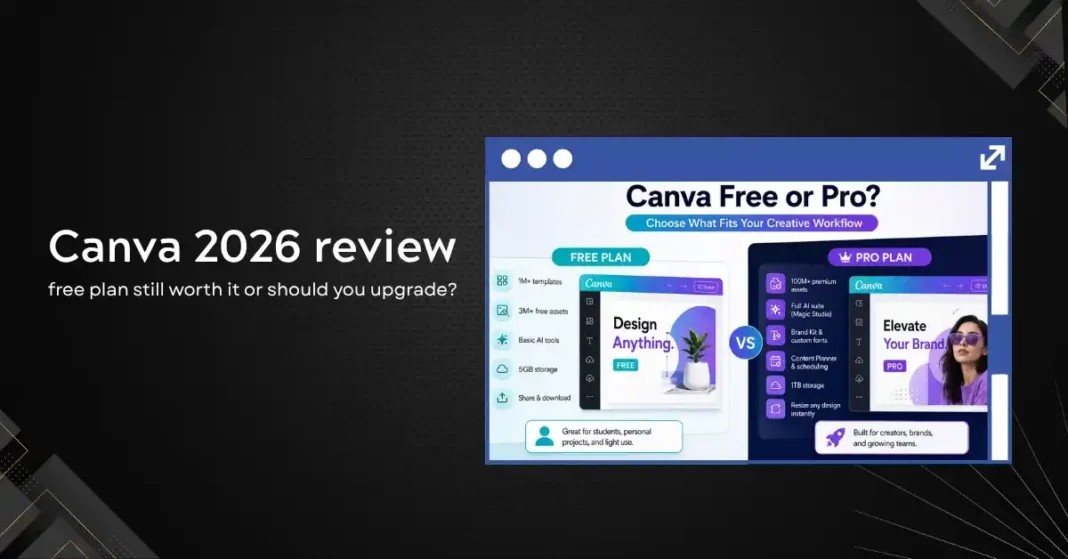
Canva has gone from a simple drag-and-drop design tool to something that looks, in 2026, more like a creative operating system for teams. The feature list has expanded to include AI image generation, video editing, presentation building with AI, document creation, a website builder, social media scheduling, and a suite of brand management tools. With all that growth, the free plan has not kept up. This review looks honestly at what Canva free gives you in 2026, what you lose by not upgrading, and whether the paid tiers are actually worth the cost for different types of users.
What Canva Free Covers in 2026
The free plan in 2026 gives you access to over one million templates, a library of more than three million stock photos and graphics, and the core drag-and-drop editor. You can create social media graphics, presentations, documents, posters, and videos using free-tier assets. Storage is five gigabytes, which is enough for moderate personal use. You can publish directly to social platforms and share designs via link.
The free AI features are limited but not nonexistent. Free users get a small number of AI credits each month for text-to-image generation, Magic Eraser background removal, and the Magic Write text generation tool. The credit allocation in 2026 is around fifty credits per month, which is enough for occasional use but not for anyone building regular content workflows around AI features.
For a student, hobby blogger, or someone who needs occasional graphics, Canva free is still one of the best free creative tools available. The template quality has improved consistently, the editor is fast and accessible, and the sharing and presentation features work well without requiring an upgrade.
What You Lose on the Free Plan
The practical limitations of Canva free become visible quickly for anyone producing content at volume or for professional use. The premium template and element library, which is substantially larger and higher quality than the free offering, is locked behind a Pro subscription. The free tier presents premium assets in search results but watermarks them, which creates a frustrating experience where the best option for a given design need is always slightly out of reach.
Background Remover, one of Canva’s most-used features for professional content creation, is a Pro-only feature for full access. The free tier gives you limited monthly uses, but the moment you are removing backgrounds on product images, headshots, or illustrations at any volume, the credit limit becomes a daily constraint.
Brand Kit, the feature that stores your brand colors, fonts, and logos for one-click application across designs, requires a Pro plan. For any business or freelancer creating content with consistent visual branding, doing this manually on every design is a significant time sink.
Magic Studio, which is what Canva calls its full AI feature suite in 2026, is substantially limited on the free plan. Text to Image with higher resolution outputs, Magic Expand to extend images, Magic Morph to transform elements, and the AI-powered presentation generator all require Pro or higher. The AI features that make Canva most competitive with Adobe and specialist AI tools in 2026 are almost entirely behind the paywall.
Canva Pro: What You Actually Get
Canva Pro costs approximately fourteen to fifteen dollars per month per user, or around a hundred and forty dollars per year if billed annually, as of mid-2026. The price has increased from its earlier tiers as the feature set has grown. The upgrade unlocks premium templates and stock assets (over one hundred million photos, videos, and audio tracks from partnerships with Getty Images and others), full access to Magic Studio AI tools, unlimited Brand Kits, the Content Planner for social scheduling, one-click resize to any format, and up to one terabyte of storage.
For freelancers and content creators who use Canva more than a few hours per week, the Pro upgrade pays for itself in time savings almost immediately. The premium asset library alone eliminates the need for separate stock photo subscriptions that typically cost twenty to fifty dollars per month. If you were paying for Unsplash, Shutterstock, or similar services, consolidating into Canva Pro often results in a net saving even at the higher price.
The Magic Studio features in Pro are the most meaningful upgrade in 2026. The text-to-image generator with higher resolution outputs, the ability to generate custom illustrations that match your brand style, and the AI presentation builder that takes a topic and produces a complete formatted deck are all genuinely useful for regular content creation. These features work well enough that many designers are using Canva Pro as their primary tool for certain project types rather than a supplement to Adobe Creative Suite.
Canva for Teams: When Does It Make Sense?
Canva for Teams starts at around twenty-nine to thirty dollars per month for the first five users, with a per-seat cost for additional members. The upgrade over Pro adds team collaboration features, admin controls, brand guidelines enforcement across team members, and shared asset libraries. For organizations with more than two or three people regularly creating content, the Teams tier addresses a real problem: keeping visual consistency when multiple people are producing graphics independently.
The Brand Kit enforcement feature, which prevents team members from using off-brand colors or fonts without explicit permission, is the most undervalued feature in Canva for Teams for marketing managers. Scaling content production across a team without that control typically leads to visual inconsistency that undermines brand recognition over time.
For very small teams of two to four people, the cost differential between five individual Pro accounts and a Teams plan is relatively small, and the collaboration features often justify the difference. For larger teams, the per-seat pricing can accumulate, and it is worth comparing the total Teams cost against a combination of Pro accounts plus a separate project management or collaboration tool.
The AI Feature Quality: Honest Assessment
Canva’s Magic Studio AI features in 2026 are genuinely capable for their target use cases, which are business and social content rather than fine art or photorealistic generation. The text-to-image outputs look professional and are well-suited to blog thumbnails, social graphics, and presentation slides. They are not at the level of Midjourney for artistic or highly stylized work, and they are not trying to be. The target user is a marketing manager or content creator who needs on-brand visuals quickly, not a digital artist.
Magic Write, the text generation feature, is adequate for short-form content like social captions, presentation bullet points, and brief copy. For longer content like blog posts or article drafts, it is outperformed by Claude or ChatGPT, and the experience of writing in Canva’s editor is less fluid than in a dedicated writing tool. Magic Write is best used for content that lives inside a design, not as a standalone writing assistant.
The AI presentation builder, which takes a prompt and generates a complete multi-slide deck, works better than most people expect the first time they try it. The layouts are sensible, the content is relevant, and the structure follows presentation logic rather than just generating generic slides. The output still requires editing and customization to feel personal, but it provides a useful starting point that saves meaningful time on the first draft.
Canva vs Adobe Express: The Free Tier Comparison
Adobe Express is Canva’s most direct competitor for casual and semi-professional design use in 2026. Adobe’s free tier is more generous in some areas: it includes Adobe Firefly AI image generation credits at no cost, access to Adobe Fonts, and the benefit of Adobe’s commercial safety guarantee for AI-generated content. For users who prioritize commercial licensing certainty, Adobe Express free is a strong alternative.
Canva’s free tier beats Adobe Express on template volume, ease of use for non-designers, and the breadth of design formats covered. The Canva editor is also more polished and faster for most people who come from a non-design background. Adobe Express has improved significantly but still has a slightly steeper learning curve.
For a creative professional already in the Adobe ecosystem, Express Pro bundled with Creative Cloud is the obvious choice. For everyone else, Canva Pro offers more value for the same price point, assuming AI commercial licensing is not the primary concern.
Who Should Stay on the Free Plan
Students and casual users who need to create presentations, posters, or occasional social graphics will find the free plan fully functional for most of their needs. The template library is extensive enough, and the editor is capable enough, that most personal-use design tasks can be completed without upgrading.
Small nonprofits and registered charitable organizations can apply for Canva for Nonprofits, which gives access to Pro features at no cost. If you qualify, the free nonprofit plan is one of the best deals in creative software.
Anyone who only needs Canva occasionally, less than a few times per month, is probably not going to get enough value from the Pro tier to justify the ongoing cost. Canva’s pricing does not include a pay-per-use option, so light users are better served by the free plan supplemented by a stock photo site when higher-quality assets are needed.
The Verdict
Canva free in 2026 is still one of the best no-cost creative tools available, but it has clearly been designed to push active users toward a paid upgrade. The AI features, premium assets, and brand consistency tools that make Canva genuinely useful for professional content creation are almost all behind the paywall.
For freelancers, marketers, and content creators who use Canva regularly, the Pro upgrade at fifteen dollars per month is worth it if the combination of premium assets, AI features, and Brand Kit saves an hour or more per week. At typical professional hourly rates, it pays for itself in the first day of the month.
For teams, the Teams tier solves a real collaboration and brand consistency problem that individual Pro accounts do not address. The cost scales with team size, but for organizations where visual consistency directly affects brand perception, the investment is defensible.