Content creation in 2026 looks nothing like it did three years ago. The tools have multiplied, the capabilities have expanded far past what early adopters expected, and the gap between creators who use AI well and those who treat it as an afterthought has grown into a competitive divide. This review covers eight AI tools that were tested across writing, video, and design workflows over several weeks, with an emphasis on what each tool actually delivers in day-to-day use rather than what the marketing pages promise.
How This Review Was Conducted
Each tool was tested for a minimum of two weeks of daily use across a set of common content creation tasks: drafting long-form blog posts, writing and editing short-form social content, generating images for articles, editing video, creating presentations, and repurposing content across formats. The evaluation criteria were output quality, ease of use, speed, pricing relative to value, and how well each tool handles the edge cases where real workflows break down.
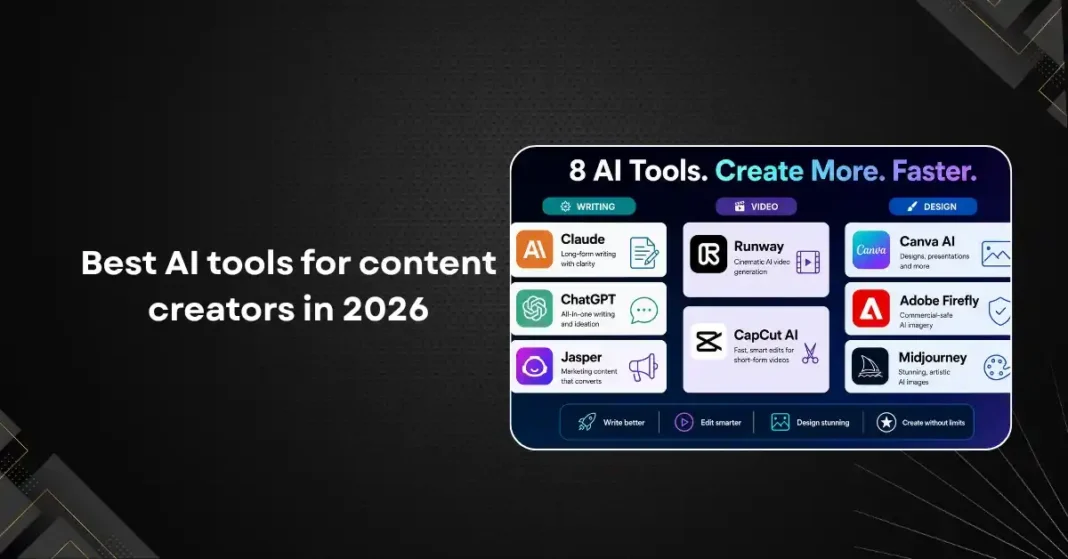
The eight tools in this review cover three categories: writing (Claude, ChatGPT, Jasper), video (Runway, CapCut AI), and design (Canva AI, Adobe Firefly, Midjourney). Each section includes a practical assessment of strengths and limitations rather than a feature checklist.
Writing: Claude (Anthropic)
Claude is the writing tool that surprises most people who have only used ChatGPT. The output quality for long-form content is higher, with better paragraph-to-paragraph coherence, fewer filler phrases, and a natural handling of nuance that makes the writing feel less obviously machine-generated. For first drafts of articles in the two thousand to three thousand word range, Claude consistently produces material that requires less editing than the equivalent from most other tools.
The Projects feature, which lets you save custom instructions and context for specific content types, is one of the most useful things in any writing tool in 2026. A blogger can configure a project with their writing style, audience assumptions, SEO preferences, and brand voice, and every draft in that project benefits from that context automatically. This eliminates the repetitive work of re-explaining the brief on every session.
The limitation is that Claude does not generate images, cannot publish directly to platforms, and does not have deep integration with content management systems out of the box. It is a writing and thinking tool, not a full-stack content platform. For teams that need those integrations, Claude works best in a workflow that uses it for the writing layer and other tools for the publishing and design layers.
Writing: ChatGPT (OpenAI)
ChatGPT in 2026, powered by GPT-4o and the newer models in OpenAI’s GPT-5 family, is a strong all-rounder that has an edge over Claude in a few specific areas. The integration with plugins, web browsing, and image generation in a single interface makes it more convenient for creators who want one tool to handle multiple tasks. For short-form content, social copy, and content that benefits from a conversational tone, the output quality is competitive with Claude’s.
The CustomGPT feature, now called GPT Agents in 2026, lets creators build specialized assistants tuned to their content style and niche. A travel blogger can build an agent that writes in their voice, knows their target destinations, and follows their linking and SEO conventions. The barrier to setting this up is lower than it was a year ago, and the results are consistently better than starting fresh each session.
ChatGPT’s main weakness for professional content creators is inconsistency in tone across long pieces. Longer articles sometimes drift in register, going from conversational to stiff or vice versa, in ways that require editing passes to fix. This is less common with Claude, which tends to maintain a more consistent voice across extended outputs.
Writing: Jasper
Jasper has repositioned itself in 2026 from a general writing assistant to a marketing-focused content platform with team collaboration features, brand voice training, and built-in templates for specific marketing use cases. For marketing teams producing high volumes of product descriptions, ad copy, email sequences, and landing page content, the structure it provides is genuinely useful.
The brand voice feature, which learns from your existing content and generates new material that matches your established style, is one of the most mature implementations of this concept across all writing tools. For established brands with a large content library to train on, the output consistency is noticeably higher than tools that rely on manual style instructions.
For individual content creators rather than marketing teams, Jasper is harder to justify at its price point (around forty-nine dollars per month at the Creator tier in 2026). The templates and collaboration features that justify the cost for teams are less relevant to a solo creator who can achieve similar output quality using Claude or ChatGPT at lower cost.
Video: Runway
Runway is the most capable AI video generation tool available in 2026 for professional use. The Gen-3 and later models produce video clips that are significantly more coherent than early AI video, with fewer artifacts, better motion consistency, and improved handling of human subjects. For short-form clips, product visualization, motion graphics, and creative video projects where photorealism is not a strict requirement, Runway is a serious production tool.
The text-to-video feature remains the headline capability, but the most useful features for working creators are the editing ones. Reference image input lets you generate video that matches a specific visual style. The camera control feature allows precise specification of camera movement. Act One, Runway’s motion capture feature, transfers human movements to generated characters with enough fidelity for many commercial uses.
Pricing is the main friction point. The Standard plan at fifteen dollars per month includes one hundred twenty five credits, which is quickly exhausted on longer or higher-quality generations. Serious video creators typically need the Pro plan at thirty-five dollars per month or higher. The quality justifies the cost for professional projects, but Runway is not a casual or high-volume tool at current pricing.
Video: CapCut AI
CapCut has grown from a TikTok editing app into a broader AI-powered video creation platform that is the go-to tool for short-form video creators in 2026. The AI features, including auto-captions, script-to-video generation, background removal, face retouching, and smart cut detection, are all integrated into an interface that is genuinely easy to use on both mobile and desktop.
For creators producing social content, particularly for TikTok, Instagram Reels, and YouTube Shorts, CapCut AI is the most efficient tool in this review. The script-to-video pipeline can take a written script and produce a complete video with AI voiceover, stock footage, and captions in under five minutes. The output requires customization to feel distinctive rather than template-like, but it dramatically reduces the time from idea to posted video.
The limitation is ceiling height. CapCut AI is optimized for fast, efficient production of social-format content. For cinematic quality, complex narratives, or highly custom visual styles, it does not have the depth of tools like Runway or Adobe Premiere with AI plugins. It is a production speed tool, not a creative flexibility tool.
Design: Canva AI
Canva’s AI features have expanded significantly since their initial launch, and in 2026 the platform handles a much wider range of design needs than it did even a year ago. The Magic Studio suite includes text-to-image generation, background removal, AI-driven layout suggestions, and a presentation generation feature that takes a prompt and produces a complete slide deck with relevant content and design choices.
For content creators who are not designers, Canva AI closes the gap between wanting a well-designed graphic and being able to produce one. The text-to-graphic workflow works well for social media images, blog thumbnails, and simple promotional materials. The quality is consistently good enough for social content even if it does not match the output of Midjourney for artistic or stylized work.
Canva’s biggest advantage is the all-in-one workflow. You can go from an AI-generated image to a finished, sized, and templated social post or presentation without switching tools. For volume content production, that consolidation saves meaningful time.
Design: Adobe Firefly
Adobe Firefly is the AI image generation tool built into Adobe’s Creative Cloud, and it stands out for one critical reason: commercial safety. All Firefly models are trained on licensed or Adobe Stock content, which means the output can be used commercially without the copyright uncertainty that surrounds tools trained on scraped web data. For agencies, brands, and creators with commercial clients, this matters.
The generative fill feature inside Photoshop, powered by Firefly, is one of the most practically useful AI tools in this entire review. Extending backgrounds, removing objects, and adding elements that blend seamlessly with an existing photo are tasks that previously required significant manual Photoshop skill. With Firefly, they take seconds and the results are often production-ready.
The limitation is that Firefly’s standalone image generation quality, outside of Photoshop’s generative fill context, is somewhat behind Midjourney and even newer open-source models for purely stylistic or creative work. It is a tool for enhancing real images more than for generating original artwork from scratch.
Design: Midjourney
Midjourney remains the gold standard for AI-generated images where visual quality and artistic style are the priority. The V7 model, released in early 2026, produces imagery with a level of consistency and stylistic range that is still ahead of most competitors for purely aesthetic work. For editorial illustrations, concept art, stylized marketing imagery, and anything where distinctive visual style matters, Midjourney is the best option in this review.
The main friction points are the Discord-based interface (though a web UI has improved significantly) and the learning curve for prompt engineering. Getting consistently good results from Midjourney requires understanding how to describe style, lighting, composition, and negative prompts. The ceiling is very high for users who invest in that learning, and the output of a skilled Midjourney user is genuinely competitive with professional illustration for many use cases.
The commercial licensing situation has also improved. Paid Midjourney subscribers have full commercial rights to generated images, which removes a major barrier for professional use.
The Verdict: Building Your AI Content Stack
No single tool handles everything well. The most effective approach in 2026 is a layered stack: one writing tool (Claude for quality, ChatGPT for convenience, Jasper for marketing teams), one video tool (CapCut AI for social speed, Runway for quality), and one design tool (Canva AI for workflow efficiency, Midjourney for visual quality, Firefly for commercial safety).
The total cost of a well-chosen stack, roughly forty to eighty dollars per month depending on tier and tools selected, is justified many times over by the time savings for any creator producing content at volume. The creators who are winning in 2026 are not the ones with the most tools. They are the ones who have chosen a small number of tools well and built disciplined workflows around them.