Key Takeaways
- Google Business Profile (GBP) can now be linked directly to GA4 through Admin > Product links, no UTM tagging required.
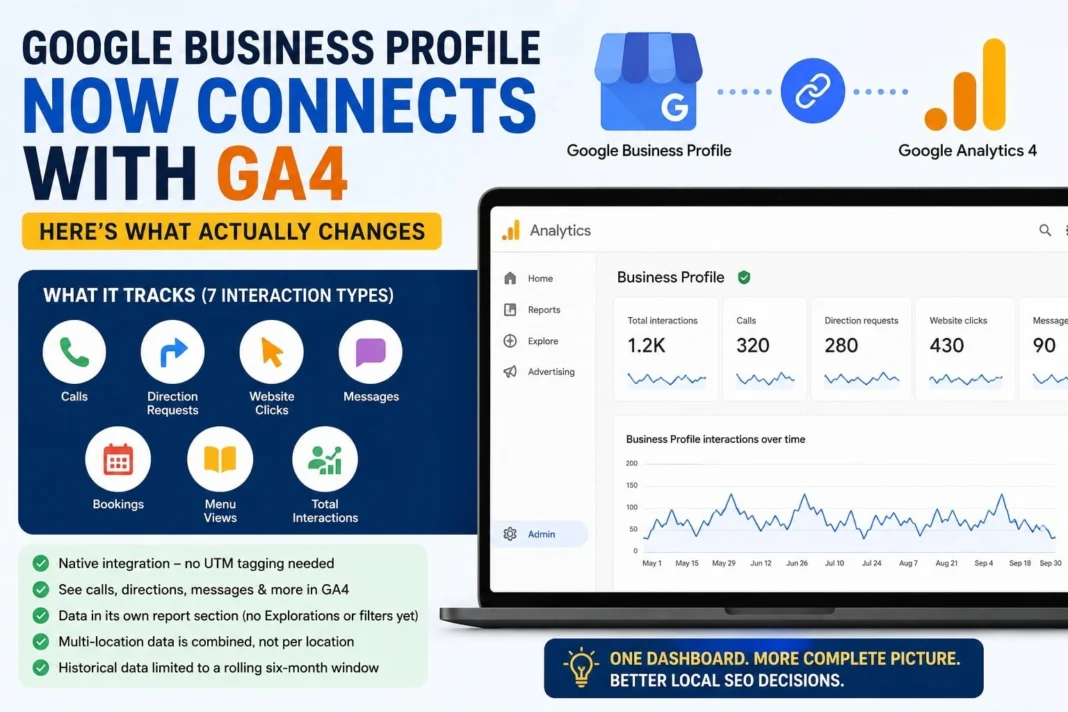
- The integration tracks seven interaction types: calls, direction requests, website clicks, messages, bookings, menu views, and total interactions.
- Data sits in its own reporting section. It cannot be used in Explorations, custom comparisons, or filters yet.
- Multi-location businesses get combined data only. There is no per-location breakdown inside GA4 once profiles are linked.
- Historical GBP data is limited to a rolling six-month window inside GA4.
For years, anyone running local SEO had to live with a split-screen problem. Google Business Profile told you how many people called your restaurant from the listing. Google Analytics told you what happened once someone landed on your website. The two never talked to each other unless you manually tagged every link with a UTM parameter, and even then, you only caught website clicks. Phone calls, direction requests, bookings? Those just disappeared into a separate dashboard nobody checked often enough.
That gap just closed. Google has rolled out a native product link between Google Business Profile and GA4, and if you manage local SEO for even one client, it is worth twenty minutes of setup time this week.
What the GBP and GA4 Integration Actually Does
Once you connect a Business Profile to a GA4 property, a dedicated Business Profile section shows up inside your GA4 reports. It pulls in seven interaction types directly from your listing: total interactions, website clicks, phone calls, direction requests, messages, bookings, and menu views.
Before this, the only way to get any of that into GA4 was UTM tagging on your GBP website link, and that approach only ever captured the click-through to your site. Everything that happened entirely inside the Google ecosystem, like someone tapping “Call” on your listing without ever visiting your website, was invisible to your analytics stack. Now it shows up next to your regular session data.
This matters more than it sounds like on paper. A dentist’s office, a local gym, a restaurant, these businesses live and die on calls and direction requests far more than on website traffic. A business owner staring at GA4 and seeing zero conversions could be getting fifteen calls a week straight from their Maps listing. The old setup hid that completely.
How to Connect Google Business Profile to GA4
The setup itself is short.
- Open your GA4 property and go to Admin.
- Under Product links, click Google Business Profile links.
- Click Link, then choose Choose Google Business Profiles.
- Select the profile or profiles you want to connect and confirm.
- Check for a green “Link created” status.
You need Editor or Administrator access on the GA4 property, plus Owner or Manager access on the Business Profile itself. If you manage client accounts and don’t have both levels of access lined up, this is where setups usually stall, so confirm permissions before you start clicking around.
One GA4 property can link to multiple Business Profiles. That sounds great for agencies juggling several client locations, but read the next section before you assume that solves your reporting problem.
The Limits Nobody’s Talking About Enough
This integration is genuinely useful, but it ships with real constraints that change how you should use it.
Combined data for multi-location businesses. If you link more than one Business Profile to a single GA4 property, the metrics blend together. A ten-location chain sees one number, not ten. There is currently no way to filter or segment by individual location inside GA4. If you need per-location detail, the Business Profile performance dashboard is still your primary source, not GA4.
No Explorations, no comparisons, no filters. GBP metrics live in a separate Standard Reports collection. You cannot drag them into a custom Exploration, run a side-by-side comparison, or apply a filter the way you would with regular GA4 events. It is a viewing layer, not yet a fully integrated data source.
Six-month data window. GA4 only retains a rolling six months of Business Profile data. Pick a longer date range and GA4 will quietly cap it at six months instead of showing an error, which can produce confusing-looking reports if you are not aware of the limit.
Every metric shows, even irrelevant ones. GA4 displays all seven interaction types regardless of business category, unlike the GBP performance dashboard, which hides metrics that don’t apply to you. A business with no booking feature will still see a “Bookings” row sitting at zero.
What This Means for Local SEO Reporting
For single-location businesses, this is close to an unambiguous win. You get calls, directions, and messages sitting in the same dashboard as your website sessions, with no UTM maintenance required. That alone removes one of the more tedious manual tasks in local SEO reporting.
For agencies managing multi-location clients, treat this as a supplement rather than a replacement. Keep using the Business Profile dashboard for per-location numbers, and use the GA4 integration mainly to show how Business Profile activity correlates with website behavior at the aggregate level, useful for explaining seasonal patterns or the impact of a local ad push, but not a substitute for location-by-location detail.
There’s also a governance question worth raising internally before you connect anything. Once GBP data lands inside GA4, who owns it? Analytics teams, local SEO teams, and paid media teams all have a reason to look at it. Without someone clearly responsible for the link, it tends to become another report that shows up automatically with no one checking whether it is accurate.
Common Mistakes to Avoid
- Linking multiple locations without realizing the data combines. Check whether you actually need separate GA4 properties per location before linking everything into one.
- Assuming six months of history will always be available. If you need long-term GBP trend data, export it from the Business Profile dashboard periodically; don’t rely on GA4 to retain it.
- Trying to build an Exploration with GBP metrics. It will not work yet. Stick to the Standard Reports view for this data.
- Forgetting to check permissions before attempting the link. Editor/Admin on GA4 plus Owner/Manager on GBP, both are required, and a mismatch is the most common reason setups fail silently.
- Dropping UTM tracking entirely. UTMs still capture nuance the native integration doesn’t, like which specific campaign or post drove a website click. Keep both running for now.
Expert Tips
If you manage several single-location clients, set up the GBP link as a standard step in every new client onboarding checklist, not an optional extra. It takes minutes and immediately gives you a stronger story than “website sessions only” in your first monthly report.
For agencies still deciding whether to consolidate locations into one GA4 property, model out what the combined Business Profile numbers would look like first. If your client cares about location-level performance (most multi-location clients do), keep their GA4 properties separate even if it means more admin overhead.
What’s Next for GBP and GA4
Google has not said whether full segmentation by location is coming, or whether GBP metrics will eventually be usable inside Explorations and comparisons. Given how quickly Google has been shipping AI-driven changes to Search and Business Profile this year, including the new Gemini integration for managing profiles directly, it would not be surprising to see this connection deepen rather than stay as a read-only reporting layer.
For now, treat it as exactly what it is: a genuinely helpful visibility upgrade with real edges you need to plan around.
Conclusion
The GBP to GA4 integration solves a problem local SEOs have complained about for years, the inability to see calls, directions, and messages alongside website data without manual UTM work. Setup takes a few minutes through GA4’s Admin panel. The trade-off is a set of real limitations: combined data across multiple locations, no Explorations support, and a six-month retention window. For single-location businesses, connect it now. For agencies managing multi-location accounts, use it as a complement to the existing Business Profile dashboard rather than a full replacement.
FAQ
Is the Google Business Profile GA4 integration free?
Yes. Linking a Business Profile to GA4 is included with standard GA4 access; no additional Google Analytics tier or paid product is required.
Do I need Google Tag Manager to set this up?
No. The link is configured entirely inside GA4’s Admin panel under Product links, with no tagging or code changes needed.
What permissions do I need to connect GBP to GA4?
You need Editor or Administrator access on the GA4 property and Owner or Manager access on the Google Business Profile.
Can I link more than one Business Profile to a single GA4 property?
Yes, but the metrics for all linked profiles combine into one set of numbers. There is no per-location breakdown once profiles share a property.
How far back does GBP data go inside GA4?
GA4 retains a rolling six-month window of Business Profile data. Selecting a longer date range will not pull older data.
Can I use Business Profile metrics in GA4 Explorations?
Not currently. GBP metrics are limited to a dedicated Standard Reports section and cannot be used in Explorations, comparisons, or custom filters.
Does this replace UTM tracking on my Business Profile website link?
Not entirely. UTMs still give you campaign-level detail that the native integration doesn’t capture, so many practitioners are running both for now.
Will this integration show data for subproperties?
No, Google’s documentation specifies that the integration is not supported for GA4 subproperties.
What happens if I delete the link later?
Only a user with Editor or Administrator rights on the GA4 property can delete the link, and doing so stops the data flow from that point forward.
Does linking GBP to GA4 affect my Business Profile dashboard?
No. The Business Profile performance dashboard continues to work as before; the GA4 link is an additional reporting view, not a replacement.
Will address changes in GBP show up instantly in GA4?
No. Google notes there is a short delay before changes made in Business Profile, like address updates, are reflected in Analytics.
Is this integration available worldwide?
Google has not published a definitive statement confirming availability for every GA4 account; rollout appears to be ongoing as of mid-2026.